Private Model Embed Integration Guide
Introduction
Private Model Embed (PME) lets you embed a private Matterport space directly into your own website — without making it public or requiring your users to log in to Matterport.
Without PME, only public or unlisted spaces can be embedded in an external page. PME removes that restriction: your server generates short-lived access links on demand, so trusted users — employees on an intranet, clients on a portal — can view private spaces seamlessly from any page you control.
Before You Begin
PME is available to Enterprise customers only. To enable it for your organization, contact your Enterprise Account Manager.
To implement PME you'll need:
- A Matterport Enterprise account with PME enabled
- A server-side script (Node.js, Python, PHP, etc.)
- A webpage embedding the Showcase Player with the Showcase SDK
Application Registration
After your organization has been enabled for PME, the first step is to regenerate the client secret for the OAuth application. You can do this by logging into Matterport Cloud (my.matterport.com) and going to Settings > Developer Tools > click the Reset secret button.
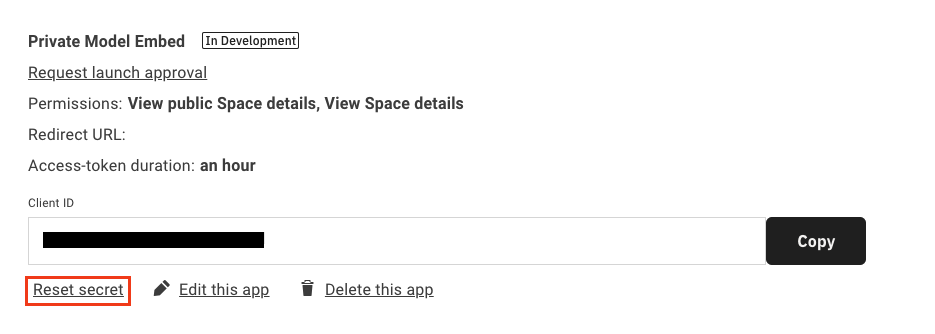
Note the client ID and the new secret, as these will be used by the application to generate tokens and links.
Authorizing to the Matterport API
The first step for an application using PME is to procure an OAuth bearer token for use in calling the Model API. To acquire an access token, a server-side POST request will need to be made to the following endpoint with the provided body fields and headers:
https://api.matterport.com/api/oauth/token
| Header Field | Value |
|---|---|
Content-Type | application/x-www-form-urlencoded |
| Post Body Field | Value |
|---|---|
grant_type | client_credentials |
client_id | OAuth App ID — found in Matterport Account Settings |
client_secret | OAuth App secret — shown once after regenerating in Account Settings |
Here is an example cURL request:
curl --location --request POST 'https://api.matterport.com/api/oauth/token' \
--header 'Content-Type: application/x-www-form-urlencoded' \
--data-urlencode 'grant_type=client_credentials' \
--data-urlencode 'client_id=[YOUR CLIENT ID]' \
--data-urlencode 'client_secret=[YOUR CLIENT SECRET]'
Sample response:
{
  "access_token": "[YOUR ACCESS TOKEN]",
  "token_type": "Bearer",
  "expires_in": 3599,
  "scope": "ViewPublic ViewDetails"
}
The access_token is then used in the Authorization header for the GraphQL request. Note that the camelCase accessToken returned by createPrivateModelEmbedLink is a separate, short-lived, model-scoped token — that one is intended for client-side use.
This token grants account-level access to the Model API. Never expose it in client-side code, browser logs, or version control. Only use it in server-side requests.
Generating a Private Link
Use the access_token as a Bearer token in the Authorization header of a server-side GraphQL mutation to the Model API:
https://api.matterport.com/api/models/graph
mutation createLink {
  createPrivateModelEmbedLink(
    modelId: "yyHDFKzPzvN" # The ID of the model to generate the link for
    clientId: "[YOUR CLIENT ID]"
    clientSecret: "[YOUR CLIENT SECRET]"
    validFor: "10m"
  ) {
    accessToken
    application
    link
    validUntil
  }
}
The link field in the response will be a fully formed URL that can be embedded in a page using an <iframe>.
Sample response:
{
  "data": {
    "createPrivateModelEmbedLink": {
      "accessToken": "[MODEL SCOPED ACCESS TOKEN]",
      "application": "showcase",
      "link": "https://my.matterport.com/show?m=yyHDFKzPzvN&auth=Bearer+[MODEL SCOPED ACCESS TOKEN]",
      "validUntil": "2022-06-03T00:33:13Z"
    }
  }
}
validFor accepts ISO 8601 durations or shorthand (24h, 5m, 30s). Maximum is 24 hours. Set it to at least 30 seconds to give Showcase time to initialize, and use createTokenRefresher to keep sessions alive as tokens expire.
Generating a Multi-Model Embed Token
createPrivateModelEmbedToken is currently in beta.
To embed more than one private model under a single token, use the createPrivateModelEmbedToken mutation. Use the returned token to construct your embed URLs.
mutation createToken {
  createPrivateModelEmbedToken(
    application: showcase
    clientId: "[YOUR CLIENT ID]"
    clientSecret: "[YOUR CLIENT SECRET]"
    modelIds: ["yyHDFKzPzvN", "abcDEF12345"]
    validFor: "10m"
  ) {
    accessToken
    validUntil
  }
}
Arguments:
| Field | Description |
|---|---|
application | The Matterport application the token is generated for. Defaults to showcase. |
clientId | The client ID of the OAuth application. |
clientSecret | The client secret of the OAuth application. |
modelIds | The IDs of the models the token should be valid for. |
validFor | The duration the token will be valid for. Accepts an ISO 8601 duration expression or simplified shorthand (1h, 30m, 90s, etc.). |
Integration with Showcase SDK
Pass the model-scoped accessToken from createPrivateModelEmbedLink to the SDK's connect method via the auth option:
const mpSdk = await connect(iframe, {
  auth: accessToken,
});
Handling Access Token Refreshing
When a user views a space with a short-lived token, the token may expire before the session ends.
Pass a fetcher to createTokenRefresher so the SDK automatically retrieves a fresh token before the current one expires:
const TOKEN_ENDPOINT = '/token';

const fetcher = {
  async fetch() {
    const response = await fetch(`${TOKEN_ENDPOINT}?modelId=${modelId}`);
    if (!response.ok) throw new Error(`Token refresh failed: ${response.status}`);
    return response.json();
  },
};

const initialToken = await fetcher.fetch();
mpSdk.OAuth.createTokenRefresher(initialToken, fetcher);
The fetcher must return an object with access_token (string) and expires_in (seconds).
Revoking a Private Model Embed Token
To revoke a model-scoped accessToken before it expires, use the deletePrivateModelEmbedToken mutation. This terminates any in-flight Showcase session currently using the token.
mutation deleteToken {
  deletePrivateModelEmbedToken(
    clientId: "[YOUR CLIENT ID]"
    clientSecret: "[YOUR CLIENT SECRET]"
    accessToken: "[MODEL SCOPED ACCESS TOKEN]"
  )
}
Sample response:
{
  "data": {
    "deletePrivateModelEmbedToken": true
  }
}